Showing posts with label iOS. Show all posts

Dec 28, 2015

Templates Available for Google Mobile Apps

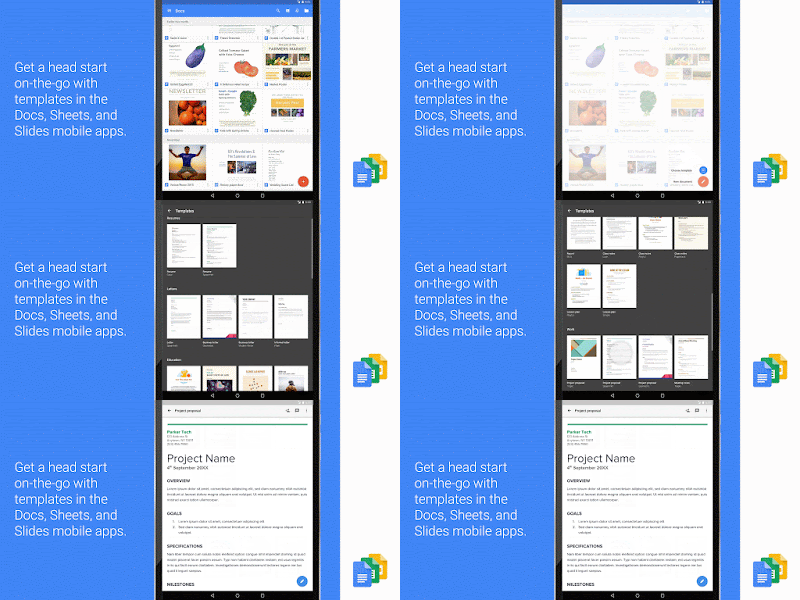
If you've been waiting with bated breath for the coming of templates to Google Mobile Apps, then wait no longer!  Yesterday, Google launched templates in Docs, Sheets, and Slides for iOS and Android.  

Now when you create a document in any of these apps, you have the option of choosing from several templates.  Now formatting is a breeze, as it has already been done for you.  Take a peek at left.  

Make sure to visit the iOS app store or Google Play Store for your mobile device and update your apps to see these changes.  Also visit the launch site to see more about these changes.

Jul 7, 2014

The Best iPad Apps for Teachers


Link to Updated Version of this Article

Looking for a few good apps to use in your classroom?  Here is a short list of apps for iOS devices and some for Android.  Thanks to the ladies at SimpleK12 at #ISTE2014 for sharing these:

Spelling city - https://www.spellingcity.com/app-redirect.html?ReturnURL=%2F  - vocabulary, spelling lists, free activities

Science 360- http://science360.gov/ipad/ - this app offers streaming video on a wide array of science topics.
History pin-http://www.historypin.com/map/#!/geo:51.6,0.05/zoom:7/  - Teachers can use this site/app to pin pictures and information related to historical topics.

Wunderlist - https://www.wunderlist.com/en/  - manage your to-do list.

Project Noah- https://itunes.apple.com/us/app/project-noah/id417339475?mt=8&ls=1  or http://www.projectnoah.org/ - tool to document and explore wildlife.

Virtual tour - Library of Congress -https://itunes.apple.com/us/app/library-congress-virtual-tour/id380309745?mt=8 - Take a virtual tour of the Library of Congress.

iTunesU - http://www.apple.com/education/ipad/itunes-u/ Download the app or visit the link for more information on virtual courses from a wide range of K-12, Colleges, or Universities.

Quizlet - http://quizlet.com or https://itunes.apple.com/us/app/quizlet/id546473125 - create and deploy quizzes on the app or online.

Kindle - https://itunes.apple.com/us/app/kindle-read-books-ebooks-magazines/id302584613?mt=8 - You don’t need a kindle to take advantage of the Amazon service.  Download the app for your iPad.  

Evernote - This note taking app allows you to curate topics from anywhere. - https://evernote.com/evernote/ or https://itunes.apple.com/us/app/evernote/id281796108?mt=8

Zite - This curation tool lets you gather articles from your favorite web news sources - https://itunes.apple.com/us/app/zite/id419752338?mt=8

Sockpuppets - This app lets you create your own sock puppet videos with backgrounds, scenery, and yes, sock puppets- https://itunes.apple.com/us/app/sock-puppets/id394504903?mt=8
Dictionary.com - Look up any word, root word, synonym, antonym...you name it. http://dictionary.com or https://itunes.apple.com/us/app/dictionary.com-dictionary/id364740856?mt=8

Space images - images and videos of stars, planets, and space.  From NASA - http://www.jpl.nasa.gov/apps/spaceimages/


Sphere 360 -  Explore or create 360∘ moments with this app using panoramic photos. https://itunes.apple.com/us/app/sphere-360o-photography/id335671384?mt=8

Bloomberg app - Math and Finance app by Bloomberg - https://itunes.apple.com/us/app/bloomberg-for-ipad/id364304764?mt=8

Khan academy - video tutorials on educational topics - https://www.khanacademy.org/ or https://itunes.apple.com/us/app/khan-academy/id469863705?mt=8

History maps - Interactive Maps of the world for iPad.  https://itunes.apple.com/us/app/history-maps-of-world/id303282377?mt=8

Stack the states - Learn the 50 states and their place on the map - https://itunes.apple.com/us/app/stack-the-states/id381342267?mt=8


Simple K12 app - Stay in Touch with SimpleK12 PD on your iPad -https://itunes.apple.com/us/app/teacher-resource-day-simplek12/id630772183?mt=8


Jul 2, 2012

Nearpod - iPad Teacher App

@KleinErin tweeted about an app called Nearpod today. This app, available for FREE in Student and Teacher versions, allows a teacher to push a presentation from their iPad to a group of student ipads with the Nearpod app installed on them.


This is something I have been waiting for for a very long time; an app that would allow the ability to share, collaborate, and poll students across the iOS platform.


Best of all, there is nothing that you need to buy. As long as you have the iPads and a wifi connection, you can use this app. All the teacher needs to do is provide their students with an access PIN that allows them to view what the teacher is presenting.

The first time I logged in, I noticed there was a "store" button. I figured it would be full of paid presentations that they wanted you to buy. But so far, the store provides a pretty good mix of free presentations (NPP Format) for download.
I also noticed that there is no button to create your own presentations. But if you visit their website, you can upgrade to the Silver edition for free. This license allows you 200MB of storage. There is a School Site License that will be coming soon.

The only drawback to using this app is that once you upgrade to the Silver Edition, you can create your own presenations but to do so you must login to the Nearpod site; you do not have the ability to create them directly from the iPad app. However, this is a small obstacle to overcome. Once you login from your PC or Mac and create your NPP Presentations, they are stored on Nearpod's site (remember you get 200MB free). I don't know how long the free upgrade will last, so you might want to check it out as soon as possible.

- Posted using BlogPress from my iPad

Jun 25, 2012

There's an App For That #ISTE12

Attended a forum for the ISTE Special Interest Group on Mobile Learning (SIGML). Presenters promoted use of the following website, which provides a resource list of apps for most any mobile platform (blackberry, iOS, android) and any age level (pre-k to PhD).
http://www.tbrmobile.org
Many apps were presented, but discussion shifted very early on to the fact that we as teachers need to speak up and tell the publishers what content, interactive, video, etc, we would like to see in the educational apps we use. Results will happen if you ask.
A few of the super cool apps presented:
Frog Dissection by Emantras
Al Gore: Our Choice
Splashtop Presenter
Verbally - provides words and phrases and speaks them aloud for special needs kids.
News in Slow Spanish -actually a podcast - provides news commentary in Spanish -can be played at slower rate for Spanish learners. Available on iTunes.
Art Rage - painting tool for the iPad. Use a stylus!
Dropbox - cant stress enough how great this file storage app is! I use it myself. Access files anywhere.
Kobo - free books
Wattpad - free original stories
Skitch - Annotate over anything.
Puppet Pals - make your own Puppet play using characters and backdrops provided. Play back on iPad. Great for building creativity.
Check them out. The level of interactive content and productivity is wonderful.
- Posted using BlogPress from my iPad

Location:ISTE 2012 San Diego, CA

Apps with Aptitude

Cathie Loesing, Program Coordinator with the eMints National Center, presented a session this morning on the use of iPads in the K-2 classroom. She stresses that when using iPads and selecting apps for lessons that teachers should focus on the following:
Apps should promote higher level thinking
Lessons should prompt community based learning
Stress inquiry based learning
She discussed many of her favorite apps, but rather than have me pick and choose, I though I would post a link to her site so you could see the apps for yourself. She lists many paid and free apps. Enjoy!
http://appswithaptitude.weebly.com/
- Posted using BlogPress from my iPad

Location:ISTE 2012

Jun 12, 2012

iOS 6 for iPhone and iPad


Recently Apple released information at the Worldwide Developers Conference 2012, that it would be updating its iOS to version 6 in the Fall.  A few of the updates include tweaks to Siri, Maps, Facebook Integration, Safari, Phone, Email and FaceTime.  But the greatest update in terms of the field of education is Guided Access.


Guided Access will focus on schools who use iPads in the classroom and for high stakes testing.  This feature will allow teachers and administrators to limit use on the iPad to one app.  This setting ensures that students will remain on the task at hand, rather than venture into other territories when they should be focused on one app.  This works by disabling the Home button during app use. 

In addition to this, VoiceOver will be fully integrated into other areas such as Maps, Assistive Touch, and Zoom, which will allow visually impaired students greater access to content. 

This change in the iOS is huge in terms of helping teachers utilize iPads as an instrument of testing and review, as students are wholly focused on the content, rather than having the ability to wander off in other areas that would tempt them to use other resources to answer questions at a time when their knowledge of content is being tested.  As well, the other accessibility tools make this update more useful to special education students who require additional assistance when using computing devices. 

How does this change in the iOS affect you?  What are your thoughts on this change?  What other changes would you like to see Apple make in the iOS to benefit educators?  Add your thoughts in a reply to this post!