
- Brainstorming
- Planning
- Collaboration
- Working On-the-Go
- Accessing Docs
Watch this video to see what I mean!


"I have posted student presentations that they have made using Google Slides, but for a parent to view these..it says they have to sign in with a Google Account. Is there any way to do this so they don't have to have a Google account to view these presentations?"This is a very common issue and can easily be resolved. The thing to keep in mind anytime you are posting Google documents on the web is to make sure you setup sharing rights properly.


Parents, This school year, we will be using Google Apps for Education in the classroom. Google Apps is a free suite of tools available to schools that includes Gmail, document creation, presentation tools, and other collaboration tools. As part of that process, from time to time, we may have the opportunity to post student work on the web. The school will work to make sure student work is shared in the safest way possible, but we want to make sure you are aware and that we have your permission to do so. No student grades will be posted. As part of that, please sign and date this slip granting the school permission to post examples of your students' work for your viewing.
Parent Signature _________________________________________Of course many districts already have a technology or internet use agreement in place, as well as permission slips for use of Google Tools. If you do not already, you may want to do so.


As many districts are rapidly approaching the start of school, it is a great time to reflect on EdTech, projects, and general tech tips. So, with that in mind, I'm passing along a list of articles to help educators start the new year!
Raise Engagement with a Hyperdoc
Start fresh with the New Google Sites
Help Your Students Learn More About You with a Teacher Trailer
Track Student Progress this Year
Broadcast Student Work with Google Cast
Try Creating A Quiz in Google Forms
Google Slides - Take Questions from your class
Choose your own adventure with Google Forms






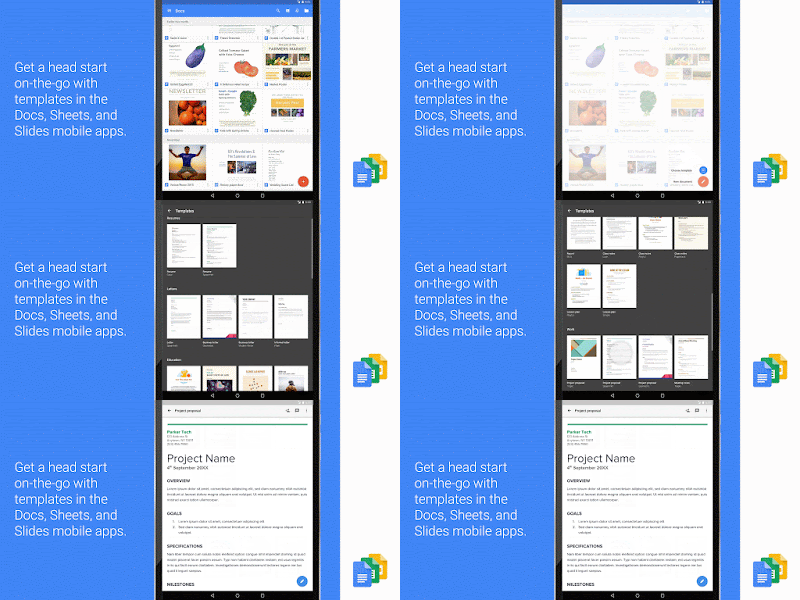 If you've been waiting with bated breath for the coming of templates to Google Mobile Apps, then wait no longer! Yesterday, Google launched templates in Docs, Sheets, and Slides for iOS and Android.


 Collavate