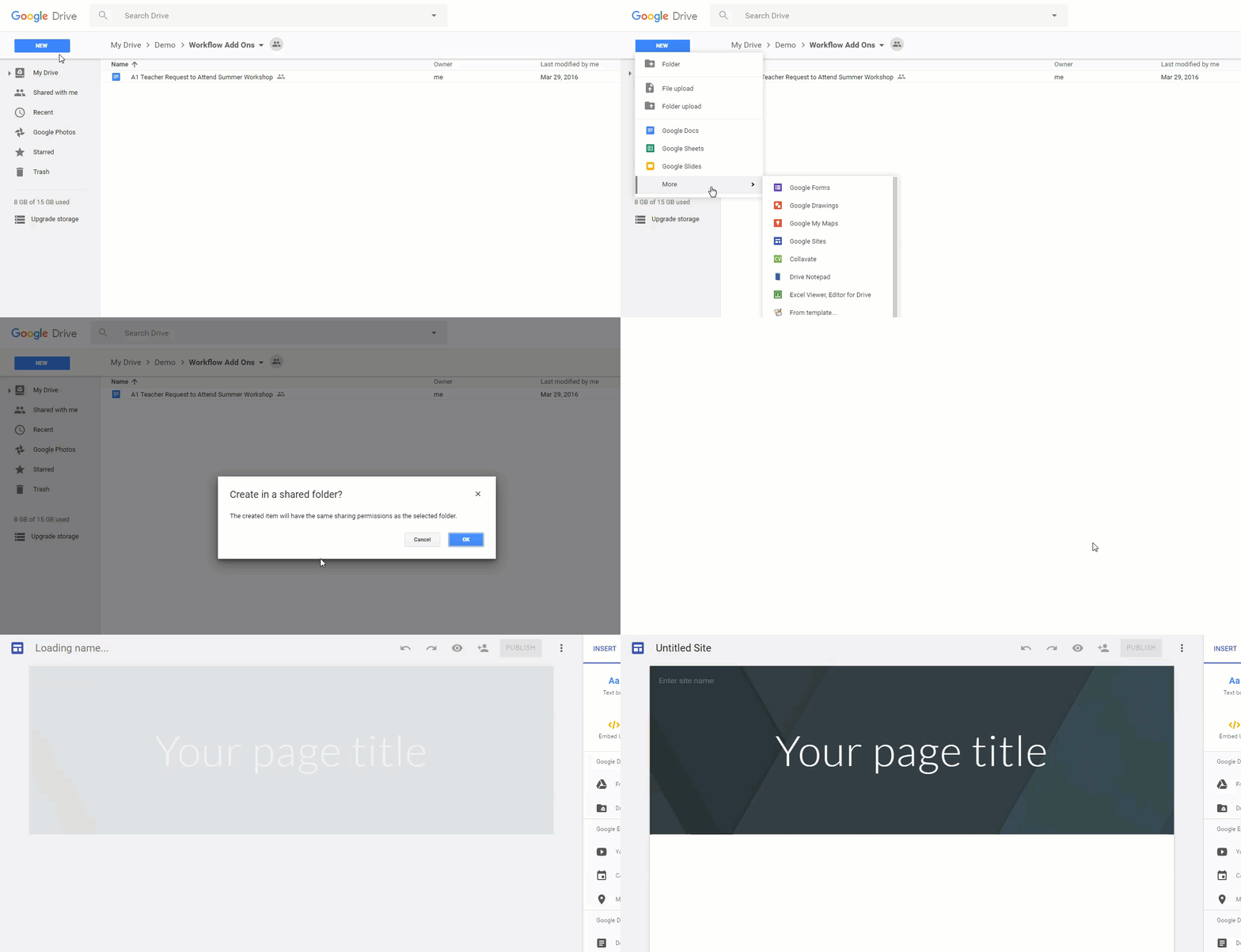
If you are a regular Gmail user (not affiliated with GSuite for Education or Work), you now have access to the New Google Sites. The New Google Sites is available through Google Drive. To use Google Sites:
Have you been anxiously waiting for the New Google Sites to come to your school? Well the wait is over. Starting tomorrow, November 9th , the New Google Sites will be available to users on the Rapid Release track (Scheduled Release Track launches on Nov 21).
For those who have been waiting for this release, here are a few tips regarding this release... Google Admin Users, scroll to the bottom of this article for important info.
Teacher Users
New Google Sites will be available through Google Drive. Just go to http://drive.google.com and click New > More > Google Sites to create your site. New Google Sites will also still be available at http://sites.google.com. You will have to click New Google Sites in the left margin. If you want to learn more about this release and how the New Google Sites looks and feels, watch this tutorial video.
Adding Content
Its easy to add content to your New Site. Just double click anywhere on your page, and a page editor wheel will appear allowing you to insert Images, Links, Text, Drive Files, or uploaded documents.
Google Apps Integration
You still have the ability to integrate and add content from a wide variety of Google Apps and Tools. Add content such as:
Embed
YouTube
Google Calendar
Google Maps
Insert
Google Drive Folders
Google Docs
Google Slides
Google Sheets
Google Forms
Charts from Sheets
Responsive Design & Themes
Page and Subpage Navigation - Nest pages under each other for Subpage navigation - just drag and drop.
Easily add Theme Presets. Just click the Themes menu and choose from 6 design themes.
Image Resizing - As you add images to your page, you can resize them. Sites will automatically crop them for optimal viewing, but you can always uncrop as needed.
Drag, Drop and Resize Content - All sections, images, and inserted items can easily be edited just by dragging and dropping, or using the resize tools.
Watch for additional features to be released over the next year....
Google Admin Users
If you are the Google Admin for your district, and you wish for your users to have access to the New Google Sites, it is important that you do the following:
Classic Sites and Google Drive must be enabled for your organization. You can find instructions to turn it on here.
New Sites will follow Google Drive sharing settings in the Admin Console. It will not follow the sharing settings for Classic Sites.
To edit Sharing Settings for New Sites go to Apps > GSuite > Drive.
To edit Sharing Settings for Classic Sites, go to Apps > GSuite > Sites
The New Google Sites has a release date for GSuite Schools! According to news in my inbox today, Google will release the New Google Sites on November 9th. This release of Sites offers some visual advantages over the old sites, as well as new features and will continue to add some of the older settings and tools you are used to. If you'd like to take a look at the New Google Sites, watch here:
As your school district prepares for this release, there are a couple of things to keep in mind:
The Rapid Release is November 9th. Domains set to a Scheduled Release track will see Sites 2 weeks later.
Districts will need to make sure that Google Sites and Google Drive are enabled on the domain in order for users to take advantage of this tool.
Sites will still appear at http://sites.google.com, but will also appear as a tool in Google Drive. Go to New>More>Google Sites
Classic Sites will still be available for a while in tandem.
Look for a method for converting Classic Sites to the New Google Sites in the future.


 Its easy to add content to your New Site. Just double click anywhere on your page, and a page editor wheel will appear allowing you to insert Images, Links, Text, Drive Files, or uploaded documents.


